Perfect Tuner
Beat Blend LabsMusic & Audio
4.21.28K Reviews
- Version
- 2.0.37
- Installs
- 10.00M
- Age Rating
- Everyone
Screenshots

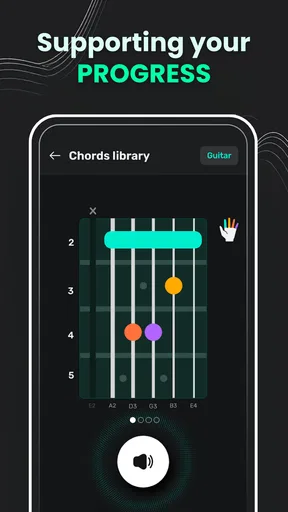

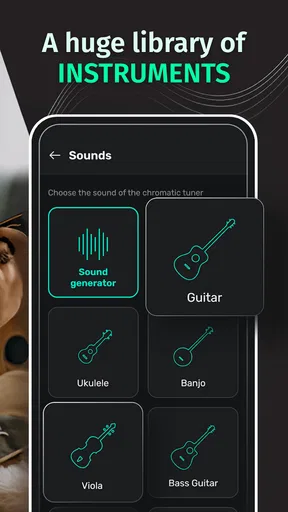
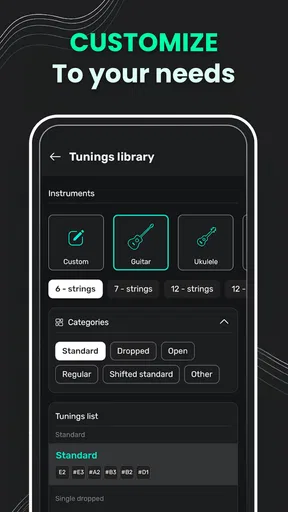
Our Review of Perfect Tuner
 Analysis by Appyee
I judge a tuner less by how many options it can advertise than by whether it helps me get ready to play without turning a quick check into a project. Perfect Tuner is aimed at exactly that everyday job: it uses a phone as a music tuner, with instrument choices and adjustments for players who need more than a single standard guitar setting. I like that practical focus, though I would not treat a phone app as a complete replacement for every dedicated tuner or every musician’s preferred tuning workflow.
A pocket tool for the moments before playing
The most convincing use for a tuner like this is a short, repeatable routine. Before rehearsal, I can take a moment to check each string, make a small adjustment, and then get on with playing. At home, the same approach is useful when an instrument has been sitting unused or has moved between rooms. The appeal is not that tuning becomes exciting; it is that a basic maintenance task is close at hand when I remember to do it.
That convenience makes this app especially suitable for learners, casual players, and people who switch among instruments. It can also be handy as a backup when a standalone tuner is not nearby. The trade-off is familiar: a phone has to be available, its microphone has to hear the note clearly, and the player still needs to know how to adjust the instrument. A tuner can guide the pitch, but it cannot replace careful listening or good instrument setup.
What I would check in a real room
Microphone-based tuning is most comfortable when the instrument is the clearest sound nearby. In a quiet bedroom or practice corner, I can focus on one note at a time. In a shared room, I would pause music playback, move away from conversation, and avoid tuning while other players are sounding notes. That is not a flaw unique to this app; it is a practical limitation of asking a phone to identify a pitch amid competing sound.
A useful habit is to pluck a string gently and let its note settle rather than striking it hard. A forceful attack can make a note sound briefly sharper before it calms down, which can tempt a player to overcorrect. I would also check the string again after adjusting it. The tuner can show where the note sits, but the instrument’s tuning peg or bridge is still doing the physical work, and small movements are easier to manage than large ones.
Where it fits among tuner choices
Compared with a clip-on tuner, a phone tuner is convenient when I already have the device in hand and want one tool for several instruments. A clip-on can be a better choice on a noisy stage because it reads vibration from the instrument rather than relying on the surrounding sound. A pedal tuner makes more sense for a guitarist who wants tuning integrated into a pedalboard. Those alternatives are not automatically better; they solve different problems.
Compared with a basic tuner that offers only a straightforward pitch reading, Perfect Tuner’s instrument choices and tuning adjustments give players more room to work in their preferred setup. That matters if I move between standard tuning and an alternate arrangement, but extra settings are only useful when I understand what I selected. If I am a beginner, I would start with the normal tuning for my instrument and avoid changing reference or tuning settings just to experiment before I know what they do.
Who should look elsewhere
I would skip a phone-based tuner as my sole option if I regularly tune in loud environments or need a hands-free setup while playing. In those cases, a clip-on or pedal unit may be less distracting and more dependable for the specific setting. I would also choose a dedicated specialist tool if my work depends on a particular tuning workflow that a general-purpose mobile tuner does not suit.
For someone who wants a quick tuner for practice, though, a separate device may be unnecessary. The app is a sensible fit when the phone is already nearby and the goal is simply to get an instrument ready. Its usefulness depends less on collecting every possible feature than on whether its controls match the way I actually tune.
There is also a small attention trade-off: opening a phone to tune can invite notifications or other distractions. I find it helps to do the tuning before starting a practice timer, recording session, or lesson, then put the phone aside. That turns the app into a brief tool rather than another reason to keep checking a screen between takes.
Perfect Tuner is a music and audio app from Beat Blend Labs. It is free to install, has an Everyone content rating, and offers optional in-app purchases ranging from $0.99 to $99.99 per item. Its average rating is 4.4 from around 75,000 ratings, with over 10 million installs. It was released on May 30, 2014, and version 2.0.37 requires Android 6.0 or later. I would treat those details as context rather than proof that it will suit every instrument or room: the best test is whether it reads your instrument clearly in the place where you plan to use it.
A practical first check is to choose your instrument, tune in a quiet space, and compare the app’s guidance with the sound of the note after it settles. If the reading jumps around, try moving closer to the instrument and reducing nearby noise before making a large adjustment. This simple check helps distinguish a setup problem from an instrument that genuinely needs attention, and it prevents unnecessary turns of the tuning peg.
For a beginner, the main question is whether the app can make tuning less intimidating. A visual pitch reading can provide a useful reference, but I would still learn the names and intended pitches of the strings rather than relying on a screen without understanding the task. For a more experienced player, the question is different: do the available instrument and tuning choices match the way you work? If yes, the phone format is convenient; if not, a specialist tuner is a more sensible purchase.
Another everyday case is sharing one tuner among instruments at home. I would select the correct instrument before starting each check instead of assuming one setting applies to everything. That small pause is worthwhile: using the wrong instrument choice can make a correct note look unexpected and encourage needless adjustments. When the instrument is unfamiliar, I would confirm its intended tuning first, then use the app as a guide rather than guessing from the display.
What is Perfect Tuner?
Perfect Tuner is a nifty little app available for both Android and iOS that transforms your smartphone into a versatile tuner for a variety of instruments. Whether you’re strumming a guitar, plucking a bass, or even bowing a violin, this app has you covered. It’s like having a personal digital tuner right in your pocket.
Easy to Use Interface
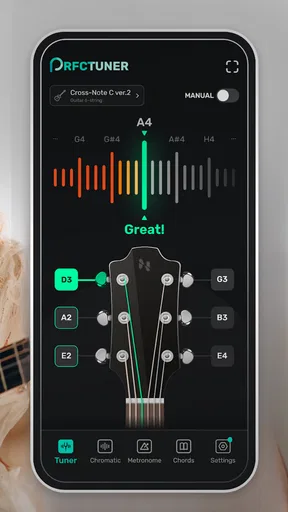
Let’s talk about the interface first. When you open Perfect Tuner, you’re greeted with a minimalist design that’s super easy to navigate. The app doesn’t bombard you with unnecessary features or confusing options. Instead, it focuses on the essentials, which I absolutely love. You get a clean, intuitive layout where you can select your instrument and start tuning right away.
Accurate Tuning
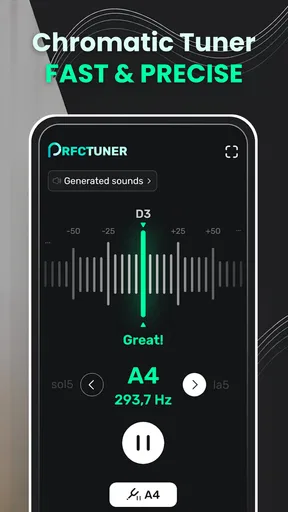
Accuracy is the name of the game with Perfect Tuner. I’ve tried several apps in the past, but this one consistently hits the mark. The app uses your phone’s microphone to detect the pitch and provides real-time feedback. It’s sensitive enough to catch even the slightest deviations, ensuring your sound is perfect every time.
Multiple Instrument Support
If you’re like me and dabble with more than just one instrument, you’ll appreciate the broad range Perfect Tuner supports. From the usual suspects like guitar and bass to more niche instruments like the ukulele and cello, the app can handle them all. It even includes alternate tuning options, which is great for those who like to experiment with different sounds.
Customization and Features
Customization is another area where Perfect Tuner shines. You can adjust the reference pitch, change the display mode, and even set your preferred tuning method. The app also offers a noise filter, which is a lifesaver in loud environments. It’s these little extras that make a big difference for me.
Free vs. Paid Options
Now, let’s discuss the elephant in the room – the price. Perfect Tuner offers both free and paid versions. The free version is quite robust on its own, providing all the basic functionalities you’d need for casual tuning. However, the paid version unlocks additional features like advanced tuning modes and an ad-free experience. Personally, I found the free version to be sufficient, but if you’re a serious musician, the paid upgrade might be worth your while.
User Experience
In terms of user experience, Perfect Tuner is a breeze. The app is lightweight and doesn’t bog down your phone’s performance. I’ve used it on both older and newer devices without any hiccups. Plus, it’s regularly updated, so you can expect consistent improvements and bug fixes.
Conclusion
In the end, whether you’re a professional musician or just someone who loves to play music, Perfect Tuner is a must-have app. It’s reliable, easy to use, and incredibly effective at what it does. So next time you find yourself in a bind trying to get your instrument in tune, give Perfect Tuner a shot. You won’t be disappointed.
Ready to try it out? You can find Perfect Tuner available for download on both the Google Play Store and the Apple App Store. Happy tuning!
Verdict
Strengths of Perfect Tuner
- User-friendly interface for easy tuning.
- Supports a variety of instruments.
- High accuracy in pitch detection.
- Customizable tuning settings.
- No ads for uninterrupted tuning.
Limitations of Perfect Tuner
- Limited features in free version.
- Requires internet for full functionality.
- Interface lacks advanced options.
- Occasional lag on older devices.
- No direct support for rare instruments.
Other Releases by Beat Blend Labs
View All
Drum Set - Drumming App
Music3.8

Flat Equalizer - Bass Booster
Music & Audio4.7
Similar Picks in This Category
View All
YouTube Music
Google LLC4.4

Samsung Music
Samsung Electronics Co., Ltd.3.8

Spotify: Music and Podcasts
Spotify AB4.3

JioSaavn - Music & Podcasts
Saavn Media Limited4.3

Lark Player:Music Player & MP3
Lark Player Studio - Music, MP3 & Video Player4.6

StarMaker: Sing Karaoke Songs
SKYWORK AI PTE. LTD.4.3
Frequently Asked Questions
What is Perfect Tuner, and how does it work?
Perfect Tuner is a mobile application designed to help musicians accurately tune their instruments. It uses your device's microphone to detect pitch and provides real-time visual feedback to guide you in tuning. Whether you're tuning a guitar, violin, or any other stringed instrument, Perfect Tuner offers precision and ease of use.
Is Perfect Tuner suitable for beginners?
Yes, Perfect Tuner is ideal for beginners. The app features an intuitive interface, making it easy to navigate and understand. It provides clear visual cues and step-by-step instructions to help new musicians tune their instruments accurately, ensuring a smooth learning experience from the start.
What types of instruments can be tuned with Perfect Tuner?
Perfect Tuner is versatile and supports a wide range of stringed instruments, including guitars, violins, cellos, and ukuleles. The app is continually updated to include additional instruments, ensuring that musicians of all kinds can benefit from its precise tuning capabilities.
Does Perfect Tuner require an internet connection to function?
No, Perfect Tuner does not require an internet connection to function. Once downloaded, it operates offline, allowing you to tune your instrument anywhere, anytime. This makes it a reliable tool for musicians who frequently practice or perform in areas with limited connectivity.
Are there any in-app purchases or ads in Perfect Tuner?
Perfect Tuner offers a free version with basic tuning features, supported by ads. For an ad-free experience and access to advanced features such as custom tuning settings, users can opt for a premium version through in-app purchases. This flexibility allows users to choose the best option for their needs and budget.
